Friday, November 6, 2009

Fix-It Friday #35

Another "Fix-It-Friday" from iheartfaces. Haven't done one of these for a while, but since I've been doing some photo editing lately anyway, I figured it would be nice to take a break with a fresh, pretty face. :-)

Original photo, which can be found here, taken by the author of this blog.


My fix:


My editing steps (using PSE7):
* Rotated the photo (obviously ;-)).
* Shadows / highlights -- lightened shadows, darkened highlights a twinge, and brought up midtone contrast just slightly.
* Brightness / contrast -- brought both these up a little.
* Cropped just a little off the top and left side.
* Adjust hue / saturation -- increased saturation of red tones.
* Sharpened a bit.
* Applied unsharp mask.
* Used the blur tool on her skin a little (which didn't do a whole lot).
* Brought up temperature to a slightly warmer (more yellow) tone.
* Ended up bringing the highlights back up in the end, so that probably undid some of my first step. ;-)

And there you have it!

Monday, September 28, 2009

iHeartFaces -- "Blue"


Theme: "Blue"


My daughter looking through a little porthole in a tunnel at the playground. :-)

Critiques, compliments, and all other comments welcome. Check out some of the other entries at iheartfaces.blogspot.com!

Monday, September 21, 2009

iHeartFaces -- "Completely Candid"


Theme: "Completely Candid"


Critiques, compliments, and all other comments welcome. Check out some of the other entries at iheartfaces.blogspot.com!

Monday, September 14, 2009

iHeartFaces -- "Contemplative"


My entry for the "contemplative" theme this week is this picture of one of my daughters discovering and contemplating her shadow, probably for the first time. On this day bright August day, she was happily running like crazy around the backyard after church one Sunday, dragging her special blanket behind her. After a while, she happened to turn around and catch sight of her shadow. She immediately halted and contemplated it for a second. Then she slowly began walking forward, stepping on it, seeming to marvel at the fact that dark little figure always stayed in front of her no matter how many steps she took.


Please let me know what you think of this pic! Critiques are welcome as well as compliments. I love comments!!

Also, please check out some of the other entries at iheartfaces.blogspot.com! Or join in the fun and make an entry yourself!

Tuesday, August 11, 2009

iHeartFaces: Week 29 -- Silly Faces


This picture was taken a few months ago, when I took my girls out to meet their new little cousin. With the help of one of my sisters-in-law, I got this pic of me and my 2-year-old holding my nephew. My daughter's proud, excited little face at getting to hold her cousin is one reason I chose this pic for the "silly" category, as well as the expression that my nephew is making. It cracks me up how he's looking at me as if to say, "Who the heck is THIS??"


Comments and critiques are always appreciated!

Please visit iheartfaces.blogspot.com for lots more entries!

Saturday, August 8, 2009

Fix-It Friday #23

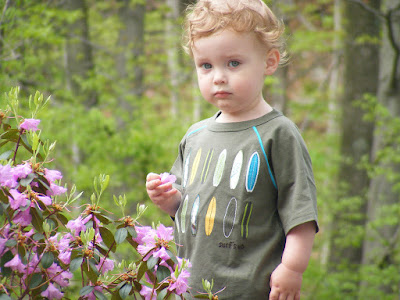
Well, I thought I'd try my hand at another Fix-it Friday picture, and for the first time I used (mostly) PSE7 to do it. I played with certain features of this one more than usual in (probably) quirky ways, but for the most part I left the rest of the picture pretty similar to the original. That probably doesn't make any sense until I explain it, though. :-)

Here is the original photo, taken by the writer of this blog:


Here is my edit:
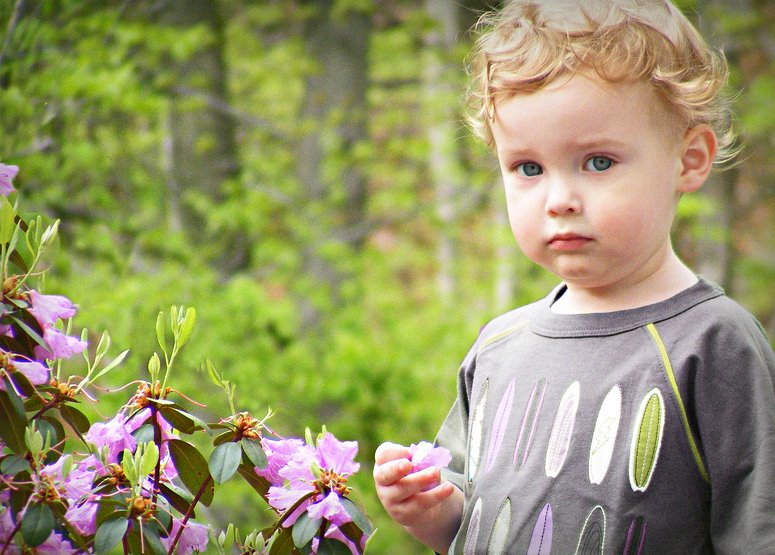


What I did:
* First of all, I wanted to crop the picture down to get this cute little guy on one side. But to do that, I kept having to crop out most of the pretty flowers. So I figured, what the heck... I'll move the flowers. So I did:
-- Selected the flowers using the Quick Selection tool.
-- Created a new layer via copy.
-- Used the Move tool to move it upward and over to the left a little.
-- Flattened the image.
-- Used the Clone Stamp tool to blend it in a bit.

* Next, I was not crazy about how the colors of his shirt clashed with the flowers. So I changed the colors of his shirt. :-)
-- Selected most of the shirt.
-- Turned down the saturation.
-- Played with the hue until it more or less matched the flowers. (I didn't even have to play with the individual surf boards on his shirt... At whatever hue it was, they all suddenly matched at the same time!)

* Then I turned to the more minor points of lighting and color, and that was the easy part.
-- Lightened the shadows a bit.
-- Brought up the midtone contrast a little.
-- Brought up the overall contrast a tiny bit.
-- Sharpened it some.

* Then I used the clone stamp tool (turned down to about 20% opacity) to lighten the dark spots under his eyes.

* And finally, I added a vignette. For this, I had to leave PSE7 and go back to my old standard Picnik, because I cannot for the life of me figure out how to do a decent vignette in PSE. If anyone has any advice on that matter, please let me know! :-)

I am still very new to Photoshop, so if this looks like a rookie's work... it is, lol. If you have any other comments or critiques on my fix, or advice on using PSE7, I would love to hear them! Thanks for visiting!

Sunday, July 19, 2009

iHeartFaces: Week 28 -- Sandy Toes


Well, I haven't entered for a few weeks (mostly due to lack of appropriate pictures for the weekly categories), but I had to come back for Foot Week! This week, instead of making sure there is a face in the picture, the challenge is to make sure there is at least one foot in the picture. So, armed with my newly-acquired Photoshop Elements 7 (which was another reason I haven't been back -- trying to figure the darn thing out!), I present my entry.


These cute little sandy toes belong to my two-year-old daughter on her birthday. I tried to make the picture look "beachy," but actually she was just playing in her new sandbox. (Shh! Don't tell!)

Please let me know what you think! Critiques are welcome as well as compliments. I love comments!!

Also, please check out some of the other entries at iheartfaces.blogspot.com! And make an entry yourself, if you wish. It's fun stuff! :-)